Keychron Thunderbolt 5 Dock: a good dock at a good price that is probably overkill for most people
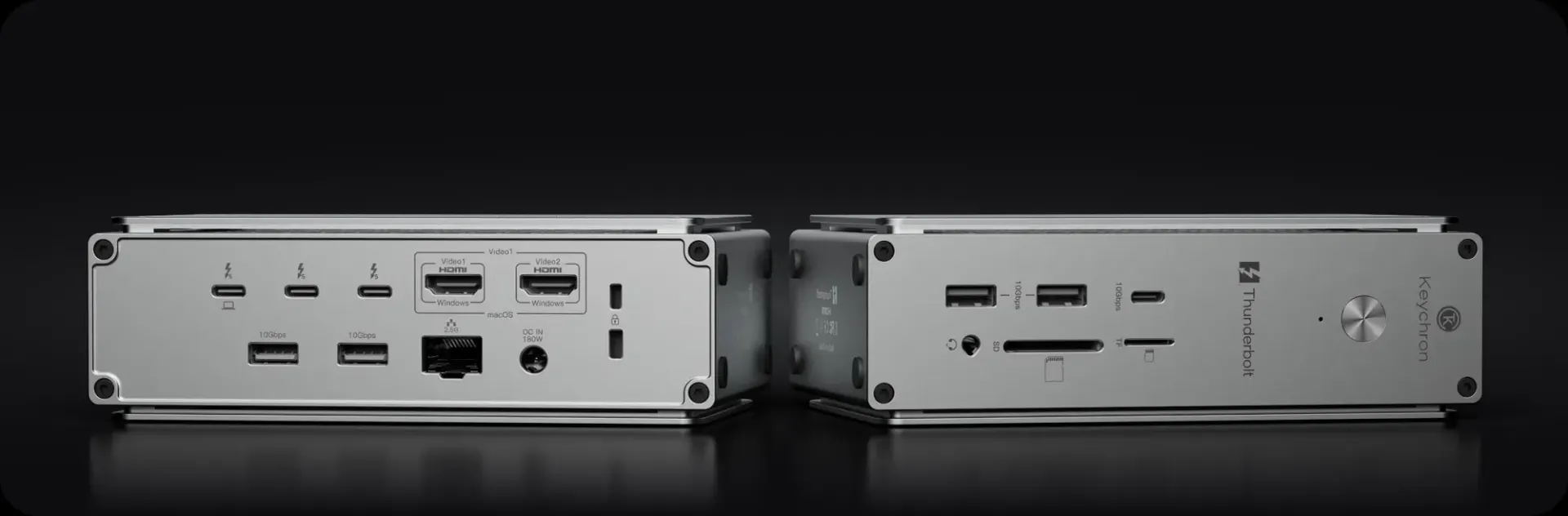
Today, famed keyboard maker Keychron has released their first Thunderbolt dock, the Keychron Thunderbolt 5 Dock (14-in-1).
Where I'm coming from
I've been using a dock for my computer for about 5 years now, and it was the single best upgrade to my desk setup I've done in years. Plugging everything from my monitor to Ethernet to accessories to SD cards into a dock, and having a single cable that plugs into whatever computer I want is brilliant. I've got a personal Mac, a work Mac, and a gaming PC at my desk, and being able to switch a single cable from one to the other and have a seamless experience is awesome.
Of course, my 5-year old OWC Thunderbolt dock uses Thunderbolt 4, which is great, but not state of the art anymore. Additionally, it's an 11-in-1 dock, of which I've used basically all it has to offer. As such, I wasn't on the verge of buying a new dock, but I was quietly curious. That's why I was excited when Keychron reached out for this review opportunity, and I said yes right away. Review unit provided by Keychron. The product was delivered as a gift, which I could choose to review or not. Keychron neither asked for, nor was given any influence over this review.
Why Thunderbolt 5?
First off, it must be said that Thunderbolt 5 is still quite niche, even in the Apple world. The following Apple silicon chips have Thunderbolt 5:
- M4 Pro
- M4 Max
- M5 Pro
- M5 Max
- M3 Ultra
I think it's important to mention this because you cannot just buy any brand new Mac today and get this functionality, you need to have a Pro chip or better from the past 2 years. Of note, you can use this dock with Thunderbolt 4 Macs, you just won't get the full speed benefits.
I'm going to briefly list out the benefits of Thunderbolt 5 over Thunderbolt 4 below, but I do think it's worth saying that I don't think most people will even notice these things have changed. I would go out on a limb and say that most of us never even come close to saturating the Thunderbolt 4 bandwidth, so these gains are not going to be noticeable for a lot of us. But let's get into them.
- 80 Gbps symmetric, up to 120 Gbps boosted one-way bandwidth (up from 40Gbps)
- Dual 8K, 4K@240Hz, multi-monitor (up from dual 4K@120Hz or single 8K)
- 64 Gbps PCIe bandwidth (up from 32 Gbps)
- Up to 140W power delivery (up from 100W)
So yeah, there are some real benefits, but they're not really things most of us will notice. My Samsung T7 SSD and SD cards are way slower than Thunderbolt 4 already, so data transfers aren't going to be any quicker, my internet connection is about 1% of the bandwidth of Thunderbolt 4, so now it's just 0.5% of of Thunderbolt 5, and my 14" MacBook Pro can only accept 100W of power delivery, so the jump to 140W doesn't help me either. Of note, Thunderbolt 5 supports up to 240W of power delivery, but Keychron's dock maxes out at 140W due to the included power adapter, which is 180W.
However, the one thing that I get from this upgrade is to the improvement to display output. My 4K@240Hz monitor works great on my Windows computer connected via HDMI, but I've had to run it at 120Hz on my Mac because the dock didn't support the bandwidth for full 240Hz.
Port selection
While this is a 14-in-1 dock, you really do need to look at what ports have been chosen by the manufacturer to know if it's the right one for you. Different manufacturers make different choices here, so you want to make sure you're getting the most bang for your buck. In addition to the Thunderbolt 5 port you plug your computer into, Keychron's dock comes with:
- 2 Thunderbolt 5
- 1 USB-C 3.2 Gen 2
- 4 USB-A 3.2 Gen 2
- 2 HDMI 2.1
- 1 2.5 Gbps Ethernet
- 1 SD card slot
- 1 TF card slot
- 1 3.5mm headphone jack
This is a fine set of inputs, but I must say that for my setup, this isn't really much of an upgrade from my old OWC dock. In fact, it's made me appreciate how perfectly aligned that OWC dock was with my needs, as even with fewer inputs, it's actually equally useful. Without listing every accessory I own, I'll just say that the headphone jack, TF slot, and both HDMI ports on the Keychron are useless to me, so this is really a 10-in-1 in terms of useful ports. When I compare the useful inputs on the OWC, I get…10-in-1 as well.
Obviously, your use case might be different from mine, but I will admit that once I got everything hooked up to this dock and realized I was equally as out of room for expansion as I was previously, I did feel a little less excited about the upgrade. As I said earlier, I really wasn't saturating any of the performance limits of Thunderbolt 4 previously, so my day-to-day experience is exactly the same as before.
But I do enjoy that I can run my monitor at its full refresh rate.
A quick word on design
A dock doesn't need to have much said about its design, after all many people will tuck it out of sight, but I do think this is a good looking dock. Its aluminum enclosure feels premium, and it just looks nice on the whole. Mine is Command Stripped to the leg of my desk, so I don't see it most of the time, but it is a nice thing to see when I go under there to plug in an SD card.
One thing I do like about the port layout is that the port that goes out to your computer is on the back side with most of the other ports. One of my pet peeves of the OWC dock is that most of the ports were on the back, but the port you connected to your computer was on the front, which meant it was impossible to have all the cables coming out of one side. Of course, if you do use all the ports, then you're going to have them coming out both sides, but you at least have a fighting chance with this dock in a way I didn't with the OWC.
Cost and recommendation
Keychron is quite competitive with their pricing, as you might expect from them. It's $349, and includes a 1-meter Thunderbolt 5 cable in the box. This is $50 less than the CalDigit TS5, which I think of as the default high end Thunderbolt dock on the market, although the TS5 has a much different selection of ports, leaning heavily into more USB-C and Thunderbolt and lacking any HDMI. Meanwhile, OWC's current Thunderbolt 5 options come in at $329 and $499, but both lose out to the Keychron in terms of I/O. In fact, I think CalDigit's $499 TS5 Plus is the dock that would be the best for me, as it leans heavily into Thunderbolt and USB-C, with 7 total inputs compared to the Keychron's 3 inputs. Obviously I'd be paying much more for that additional I/O, though.
I'm going to keep using the Keychron doc myself, but my actual advice to most people would be to not worry about Thunderbolt 5 at the moment and just find a good Thunderbolt 4 dock. I've mentioned that I've had this OWC one for years and it works great. At $229, it's notably cheaper as well, and unless you are running a 240Hz 4K monitor like me, you probably won't ever hit the bandwidth caps of Thunderbolt 4 anyway.