ROG Xbox Ally X review: amazing performance, but the worst software I've ever used
The ROG Xbox Ally X is a story in two parts. On one hand, you have hardware that is, in many ways, truly outstanding. On the other, you have a software experience that is an unmitigated disaster. It ruins the product in fundamental ways and is very possibly the worst software experience I’ve had on any computing product I’ve ever bought.
The startup experience
I’ve written about this at length before for members, but the out-of-box experience is janky, to say the least. It begins with a standard Windows setup, exactly the same as any Windows PC, such as a Dell laptop…it's not bespoke at all. You’re forced through several rounds of Windows updates that don't bother to disguise themselves, then some ROG Command Center updates, and then you're (in theory) good to go.
Once I finally reached the Xbox experience, I still couldn't launch games. For some reason, DirectX wasn't installed by default, so within minutes of owning this "console," I was in Windows desktop mode, opening a web browser, downloading an EXE, and manually installing it just to get games to boot. It is the polar opposite of a console experience (it's also messier than normal PC onboarding experiences).
And I'll say it again because it cannot be said too often. While this may have the Xbox brand on it, this is not an Xbox and it does not play Xbox games. This is a Windows PC that plays PC games. Yes, most modern Xbox games also have PC versions, and if you bought them on the Xbox store, you likely have a license to play the PC version, but your older Xbox games may not work here because there's no PC version and you're not getting the Xbox user interface. You're getting something that is a PC.
To be fair, once you survive the initial setup, the device does boot into a full-screen mode. It’s just okay, and is in the same ballpark as SteamOS, but the implementation is where the wheels fall off.
There are too many modes, too many submenus, and too much complexity. As a power user, I can navigate it while simply being annoyed, but for most users, especially those expecting a console experience, I suspect it would be inscrutable. In its attempt to be a console, ASUS has somehow created something more confusing than a straight Windows desktop, and it’s a far cry from the seamlessness of a Switch or a Steam Deck.
The actual software problem
These complexities are just the tip of the iceberg, though, and if they were the only problem, this review would be much more positive. The stability of this device is truly atrocious. Menus often require multiple button presses to appear. Power modes occasionally refuse to switch for no apparent reason.
Then there's sleep. On Windows, sleep is more of a suggestion than a function. The Ally X suffers from all the classic Windows laptop issues, such as random wakes for no reason or the screen turning off while the fans continue to spin at full tilt, churning through the battery when you think it's sleeping. And on a nearly daily basis, the device refuses to wake at all, requiring a hard reset. I hope I saved my game before I put it to sleep!
As I’m writing this, I’m in a particularly foul mood because this morning the device entered a boot loop. It would attempt to repair, fail to repair itself, and shut down. I had to dive into the BIOS, which is something I’ve rarely had to do in my life, and certainly not on a console, to initiate a network recovery. It even took three attempts to work, followed by a BitLocker recovery key entry. What went wrong? Who knows. It’s back in business for now, but I certainly don't trust it, and am on a hunt for a spare M2 drive I can flash Bazzite onto, which is much more reliable.
Hardware is this thing's saving grace
So why haven't I returned it? Because the hardware, and specifically the performance, is simply too good. If it weren't for the raw power, this would have been returned already.
The main draw of the device to me was the boosted performance you were supposed to get, and I'm happy to say this has delivered in spades for me. When it comes to performance, nothing speaks more clearly than charts. So I'm going to show you a couple charts for a specific game, which I think will illustrate the difference here quite well.
Doom: The Dark Ages is a great game for benchmarking, and I ran the same benchmark on both devices with exactly the same settings each time, and here's how they each performed at 720p.
All settings were the same, and I was using the "handheld" graphics presets on both devices. For FSR, I used the "balanced" option. Xbox numbers in green, Steam Deck in blue.
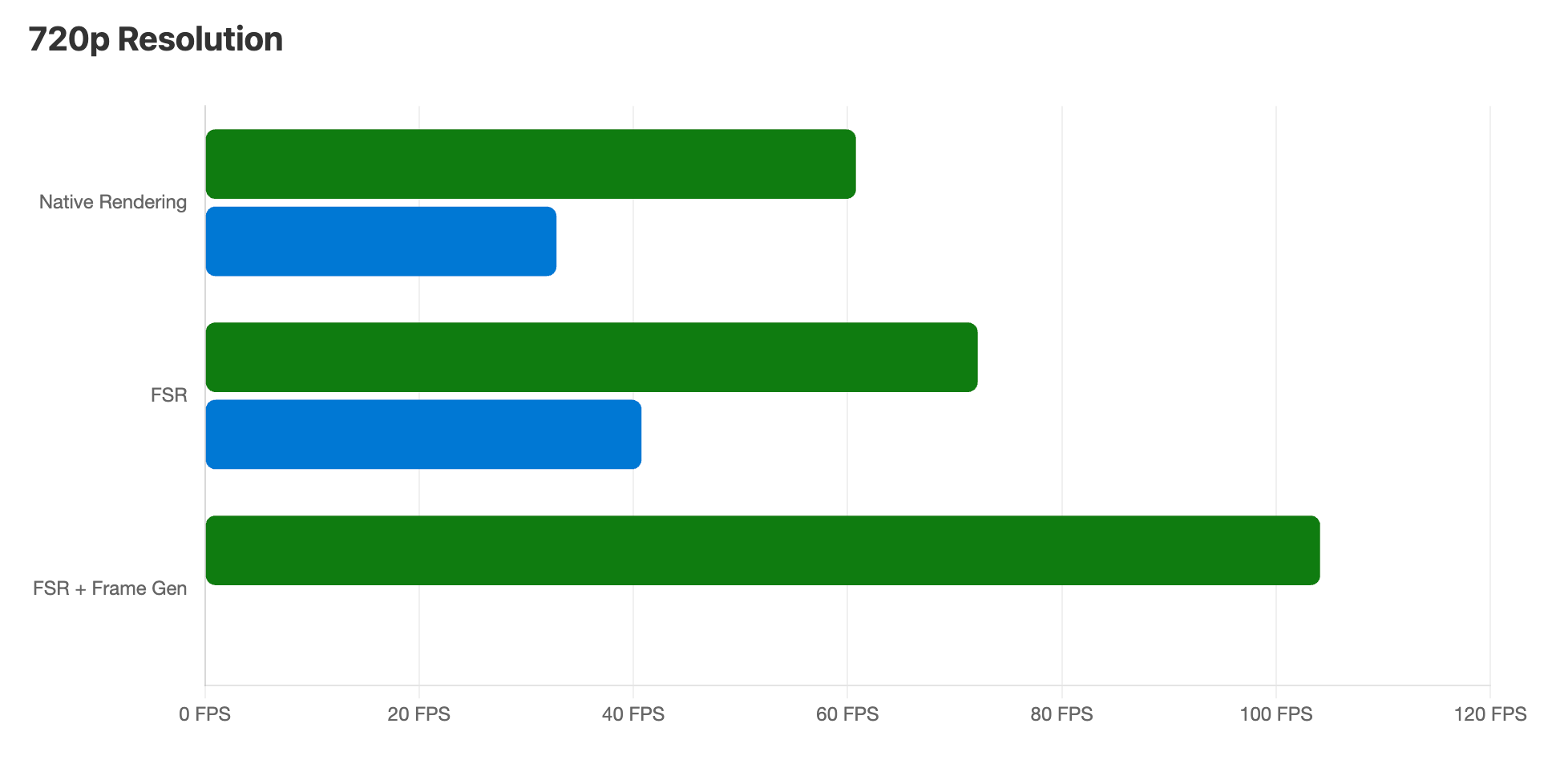
The Xbox Ally X consistently performed about 85% better than the Steam Deck across all benchmarks. That's a meaningful update, and in a title like this means I'm going from a game I can reasonably play at 30 to 40 frames per second to one that I can play at a locked 60, even without using any upscaling. That said, if I'm okay using upscaling and frame generation, this thing goes north of 100 FPS (frame generation is not available on the Steam Deck version).
But of course, the Steam Deck only has an 800p display, and Doom the Dark Ages will only render up to 720p on that device for some reason. Meanwhile, the Ally X has a 1080p screen, so you can render the game at a higher resolution.
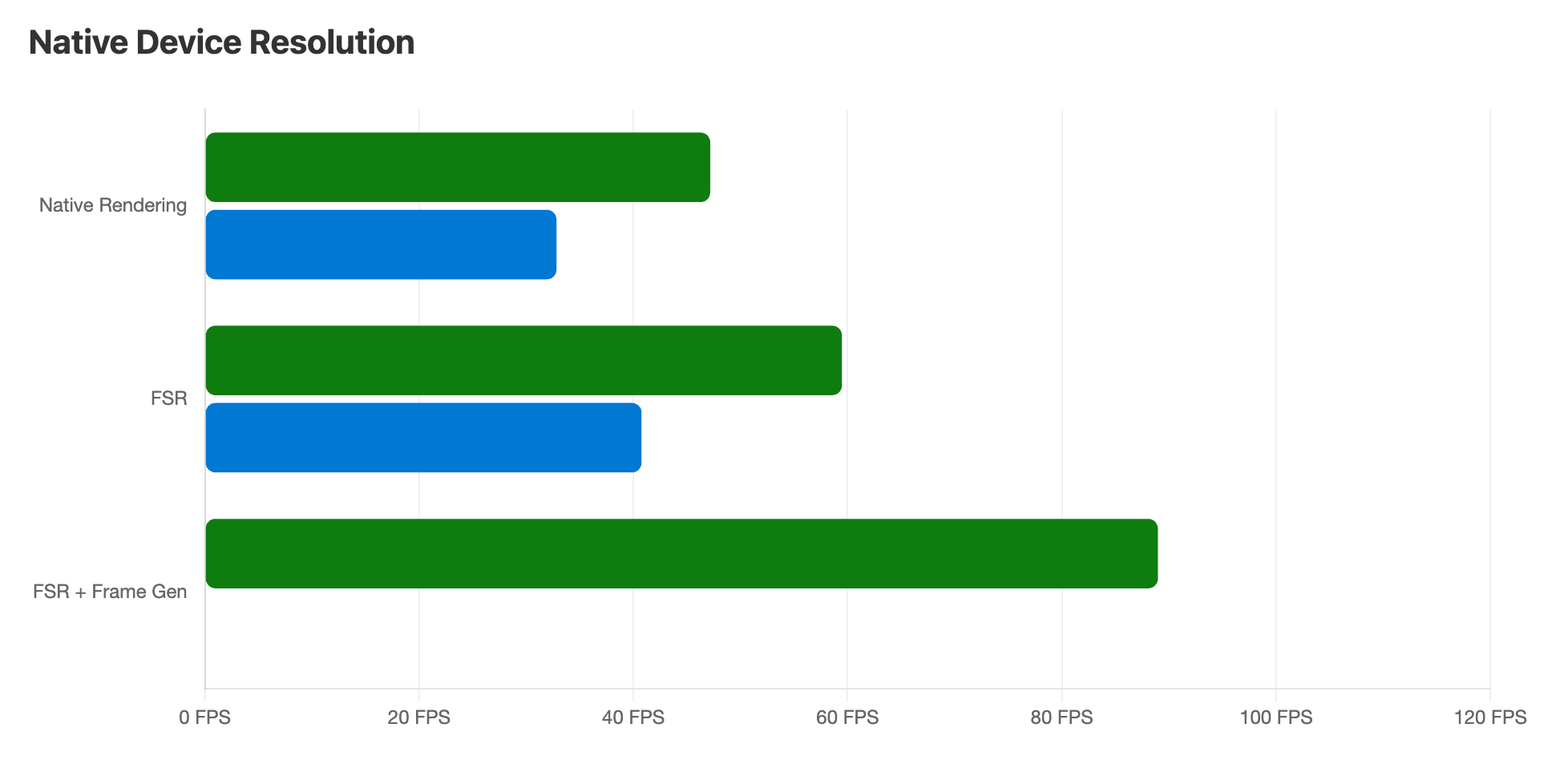
As you can see here, with FSR enabled, you're able to get a nearly locked 60 frames per second in the game, and you're well north of that if you enable frame generation.
I bring up this benchmark specifically because Doom: The Dark Ages is a great example of game that's right on the edge of being playable on a handheld device. I wouldn't say a Doom game at 30 to 40 frames per second is the intended experience of the developer, but it's technically playable. Meanwhile, the Xbox Ally X is able to achieve a consistent 60 FPS, which is a far superior experience. The fact it can also do that at a higher 1080p resolution is the cherry on top.
What I'm getting at is that while I think people who haven't used it would be surprised how many games actually run pretty well on the Steam Deck, after you use that device for enough time, you start to understand what the limits are and you know what sorts of games are simply not going to be playable or not playable in a satisfying way on the Deck. The Xbox Ally X has made me redo that calculus in my head as games like Doom: The Dark Ages and Clair Obscur: Expedition 33 have gone from games that, "technically work" to genuinely good experiences.
One of the reasons for this gap in performance is power. The Steam Deck can deliver 15 watts of power to the SoC, and that's pretty darn low energy, but it's the trade-off Valve has made so that they could make a relatively thin device that didn't get too hot and that didn't have 30-minute battery life. Meanwhile, the Ally X has several power modes you can choose between. There's a 13W silent mode, which is very low power, a 17W normal mode, and then 25W turbo mode that boosts up to 35W when plugged into a charger.
This additional power delivery is definitely going to push up the performance a bit. However, it's not the sole reason for the performance gain. As you can see, even running at the lower powered 17W mode, we're still getting a significant performance improvement over the Steam Deck.
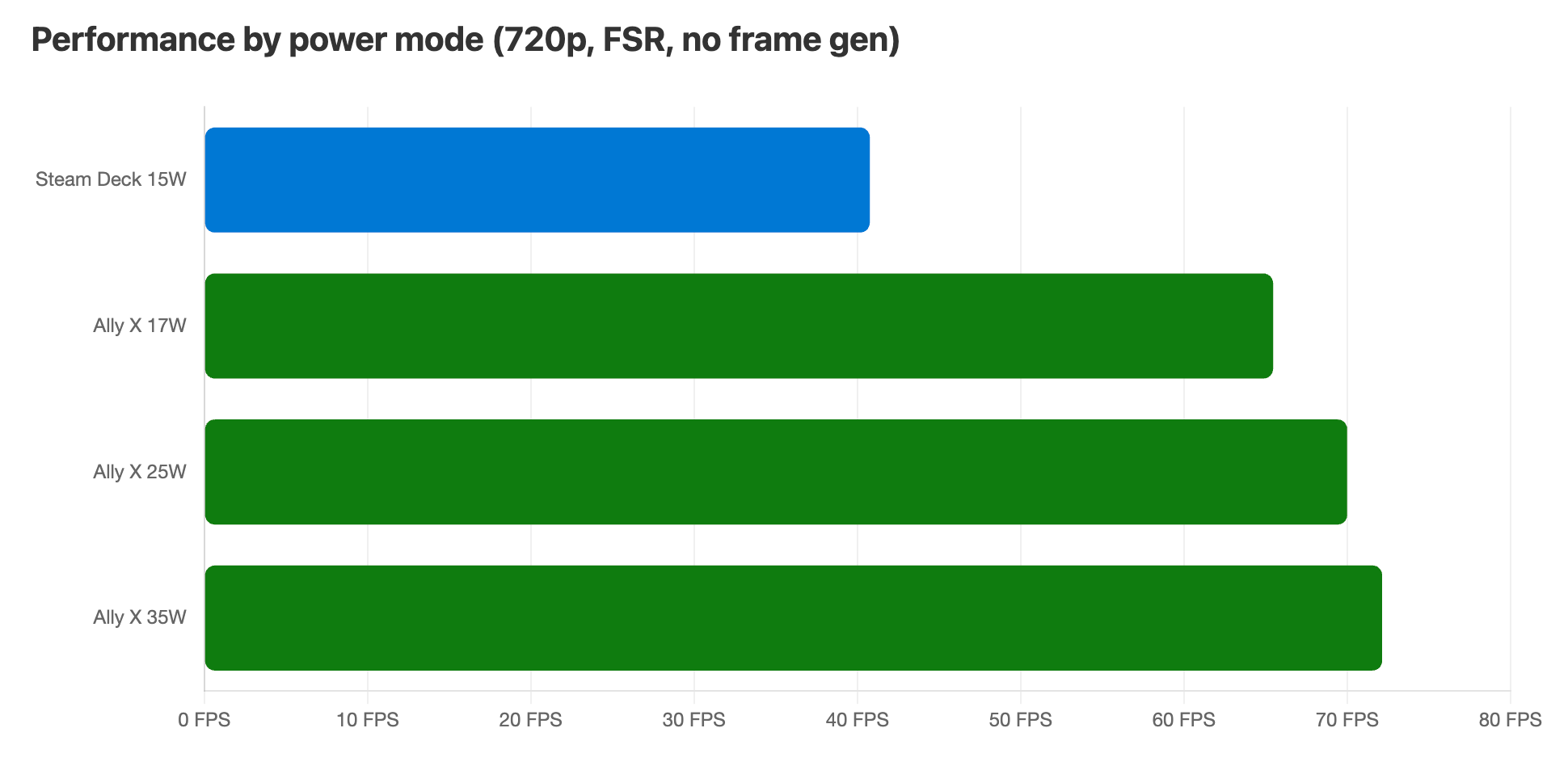
My general recommendation for people using this device would be to stick with the standard 17 watt mode by default, but if you have games that could use a little extra oomph, then enabling the turbo mode can often get you over the hump.
I'll say it one more time with emphasis. The performance advantage over the Steam Deck is extremely substantial and very noticeable. This is the killer feature of this product.
The rest of the hardware
Moving beyond the performance metrics, the rest of the hardware is a bit of a mixed bag.
On the positive front, I like that this has the charging port on the top of the device rather than the bottom, just like the Steam Deck OLED. Even better, it has two USB-C plugs so I can charge and plug in an external device at the same time. There's also a microSD card slot where you can expand storage easily and cheaply. I also think the joysticks feel really good, and notably, the fans are very quiet. Even when I'm running in turbo mode and maxing out power delivery, the fans are quieter than on the Steam Deck, to the point I barely notice them. I also really like the grips on either side of the handheld, which fit into my hands very well. It's marginally more comfortable than the Steam Deck, and way more comfortable than the Switch 2. Finally, I'm impressed by the speakers, which get properly loud.
I didn't do serious battery testing, but I will say it seems a bit better than the Steam Deck OLED to me. I played a game that maxed out the GPU for 2.5 hours and was down to about 20% battery remaining. Not bad.
But the hardware isn't a win across the board. Much like the normal Xbox controller, the face buttons are quite audibly clicky, which I don't like. I really like a nearly silent controller button, which Sony's controllers do really well, as does Nintendo's Pro Controller and even the Steam Deck to an extent. Another downside are the "utility" buttons on the face. There are five total buttons that are effectively the start, select, library, Command Center, and Xbox buttons. To me, this is just too many, and I'm often having to look up at the device to remind myself which one to press in which situation. These buttons also don't always do the same thing and they don't always function correctly the first time you press them, which makes them even more annoying.
Finally, I need to talk about the display. It has a couple of really nice aspects, as well as one aspect that makes it annoying for such an expensive product. I'm coming from the Steam Deck OLED, which has a 90Hz 800p OLED display. The OLED is incredibly high quality, and while the resolution is a little lower than something like the Switch 2, it looks sharp in most games and the refresh rate allows you to play lower-end games at up to 90Hz.
By comparison, the ROG Ally X blows past the Steam Deck with a 1080p display and a variable rate 120Hz display. That second bit is really impactful because low-end games will easily hit 120Hz, which is a little better than the Steam Deck, but it also means that higher-end games that struggle to lock to a specific frame rate will feel smoother thanks to the variable refresh rate. To put this in terms that a lot of people reading this blog will fully understand, it effectively has what Apple calls ProMotion.
However, the Achilles heel for this display is that it is an LCD, and seemingly not a super good one at that. It does not get very bright, and the viewing angles are pretty bad. This is definitely worse than what the Switch 2 has to my eye and reminds me quite a bit of the original Steam Deck, which is not a compliment. It's a shame because this is a $1,000 device and the screen feels budget in terms of brightness, colors, and viewing angles.
My recommendation
Would I recommend the ROG Xbox Ally X? Only if you are willing to put up with a lot of pain to get double the performance of a Steam Deck. When you're in a game, it feels amazing. It's everything around that experience that lets it down.
The price point is too high for an experience this compromised. If this exact hardware were running a stable version of SteamOS, it would be an easy recommendation (I'll share how things go when I Inevitably install Bazzite).
Using this for several weeks has only made me appreciate the Steam Deck more. The Deck offers a genuinely console-like experience that never forces you to see a desktop. This achievement is all the more impressive when you consider that the Steam Deck is built on Linux and is running Windows games…how is this a better experience?! I’m now just waiting for Valve to release a Deck 2 with this level of performance. Even at 2026 prices, that would easily be the best high-end portable on the market.